- Order by phone: 0800 033 8006
- Blog
- Coverage checker
- Store locator

- Three Community
- Broadband
- Intermittent connection issues loading/changing si...
- Subscribe to RSS Feed
- Mark Topic as New
- Mark Topic as Read
- Float this Topic for Current User
- Bookmark
- Subscribe
- Mute
- Printer Friendly Page
Intermittent connection issues loading/changing site- secure connection failed/site can't be reached

- Mark as New
- Bookmark
- Subscribe
- Mute
- Subscribe to RSS Feed
- Highlight
- Report Inappropriate Content
on 22-10-2023 03:21 PM
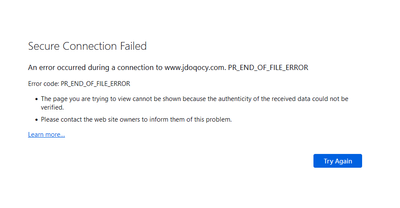
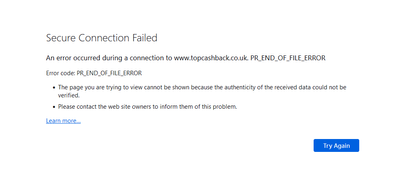
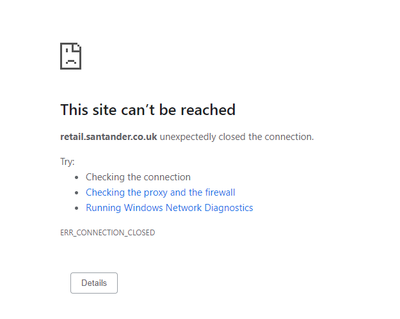
Is anyone else occasionally getting a 'connection down' error from Chrome (or 'Secure Connection Failed' from Firefox) when changing page - if I hit refresh it works fine. At first I wondered if it was the site I was using but have noticed it on multiple different major websites over the past couple of months and not noticed it from other locations where I don't use Three Broadband so does seem to be related to the router/connection (this is via wired Ethernet too, so not a WiFi problem). I've tried changing DNS server in case that helps but no difference.
It mainly seems to happen when trying to first load a site or (annoyingly) at checkout when a different site is being loaded as part of the checkout process. It certainly doesn't happen everytime but does happen with reasonable frequency. I've also noticed I often get it when trying to pull/push from/to Github too and have to do so a number of times for it to work (browsing the Github website works fine).
- Labels:
-
Home Broadband

- Mark as New
- Bookmark
- Subscribe
- Mute
- Subscribe to RSS Feed
- Highlight
- Report Inappropriate Content
11-06-2025 12:51 PM - edited 11-06-2025 12:53 PM
Github is a constant source of frustration with the connection cutting off early. Similarly just running an `apt upgrade` on Debian will often result in:
```
Err:10 http://security.debian.org/debian-security bookworm-security/main amd64 libudev1 amd64 252.38-1~deb12u1
400 Bad Request [IP: 146.75.74.132 80]
...
E: Failed to fetch http://security.debian.org/debian-security/pool/updates/main/s/systemd/libudev1_252.38-1%7edeb12u1_a... 400 Bad Request [IP: 146.75.74.132 80]
E: Unable to fetch some archives, maybe run apt-get update or try with --fix-missing?
```
This is a constant source of frustration as it bars automated management.

- Mark as New
- Bookmark
- Subscribe
- Mute
- Subscribe to RSS Feed
- Highlight
- Report Inappropriate Content
on 29-05-2025 06:56 PM
I am still around however I have been more busy and have been less able to issue updates - I did have to reset the router after many months and have decided to re-enabled all bands however the PR_END_OF_FILE error is still there
More importantly it looks like the Three members of staff are too busy taking money, running advertisements and holding the camera which is honestly disrespectful
I wonder if there will be a valid excuse given before the end of the decade...
- Mark as New
- Bookmark
- Subscribe
- Mute
- Subscribe to RSS Feed
- Highlight
- Report Inappropriate Content
29-05-2025 11:30 PM - edited 29-05-2025 11:37 PM
The "anyone still here?" was more aimed at Three than at the long suffering Broadband users. We all have better things to do than shout into the black hole that is this thread!
- Mark as New
- Bookmark
- Subscribe
- Mute
- Subscribe to RSS Feed
- Highlight
- Report Inappropriate Content
on 15-05-2025 02:16 PM
Is it time to face facts that Three have no intention to even try to identify the issue, much less fix it? We are now over 18 months since this issue was first reported and absolutely no progress has been made, and anything even remotely representing a status update has not been forthcoming for some time now.
This is, frankly, disgraceful, whilst Three still charge full price for a broken service.
- Mark as New
- Bookmark
- Subscribe
- Mute
- Subscribe to RSS Feed
- Highlight
- Report Inappropriate Content
on 13-05-2025 02:03 PM
Did a test today since the internet seemed unstable even with my mitigations - This manifested as generic connection failures rather than the PR_END_OF_FILE error
Interestingly, for five minutes, everything seemed fine however it was a hallucination - The problem still exists
With that being said, the router has been working well for about 80 days now - I have enabled Band B1 to help with the recent instability - Band B3 makes everything worse
Have there been any changes for yourselves?
- Mark as New
- Bookmark
- Subscribe
- Mute
- Subscribe to RSS Feed
- Highlight
- Report Inappropriate Content
on 25-04-2025 11:06 AM
No changes - A quick test revealed the usual issue still exists...
Fortunately my current mitigations have been working well enough that I have been shielded from the issue for almost a full year now - None of us should need to provide mitigations under any circumstances just to be able to use a service
Unfortunately for Three persons I have also advised quite a few persons to stay clear from anything from Three due to this issue not being resolved
Time not spent fixing the issue is money lost as people leave due to bad experiences and being advised to avoid Three......

- Mark as New
- Bookmark
- Subscribe
- Mute
- Subscribe to RSS Feed
- Highlight
- Report Inappropriate Content
on 25-04-2025 11:14 AM
Yeah, I've discouraged 5 or 6 people from using Three for Broadband.

- Mark as New
- Bookmark
- Subscribe
- Mute
- Subscribe to RSS Feed
- Highlight
- Report Inappropriate Content
on 28-04-2025 09:47 PM
Same, even though I left a bunch of months back (with no regrets). I've still been monitoring this closely with the look to return potentially at the end of my next contract. I'm disgusted with the lack of updates from anyone from Three, especially @JonathanB after the promised regular updates while it was being investigated, I've put multiple people off the contracts both phone and network. When it was working, it was all great......until 1) this issue, and 2) unlike other ISPs that when they go down they may be down for an hour, with Three it can be a week+ with denial of any issues existing even tho heavily evidenced from multiple neighbors. Went from 5* opinion to negative 20
- Mark as New
- Bookmark
- Subscribe
- Mute
- Subscribe to RSS Feed
- Highlight
- Report Inappropriate Content
on 17-04-2025 12:18 PM
Did a quick test and the problem, without any mitigations, still exists
It seems that the websites closer to the end of my list of problematic websites seem more likely to trigger the issue compared to those nearer the start
Either way, a problem is still a problem......

- Mark as New
- Bookmark
- Subscribe
- Mute
- Subscribe to RSS Feed
- Highlight
- Report Inappropriate Content
on 11-04-2025 02:56 PM
FIXED: Docker EOF Errors (Caused by ISP DNS Interference)
Hey all, I've been sick as a chip with this issue for months — pulling Docker images would constantly throw "unexpected EOF" or "context cancelled". I was ready to install a Virgin line on the 24th. BUT... today I gave it one last go with some AI help, and this fix looks solid so far (1+ hour of clean pulling — more than I’ve ever managed).
What’s Causing It?
Since late 2023, many of us on this ISP have experienced image pulls randomly crashing. Turns out, it’s DNS hijacking or TLS interference by the ISP. This messes with Docker registry traffic — especially for large, multi-layer images — and causes them to fail.
The Fix in Short:
- Run Unbound on your Pi/home server — your own recursive DNS resolver
- Point Pi-hole (or Docker or system-wide) at it
- All DNS now avoids Google, Cloudflare, AND your ISP
- Result? No more EOFs, secure DNS, faster pulls
What You Need:
- Raspberry Pi (or any Linux box)
- Docker (Portainer optional)
- Pi-hole (optional but helpful)
- Around 15 mins of setup
Setup Steps:
1. Create the config folder:
sudo mkdir -p /portainer/files/appdata/config/unbound
cd /portainer/files/appdata/config/unbound
2. Download root DNS hints:
sudo nano root.hints
Paste the contents from https://www.internic.net/domain/named.root
3. Create unbound.conf:
sudo nano unbound.conf
Paste the following:
server:
verbosity: 1
interface: 0.0.0.0
port: 53
do-ip4: yes
do-udp: yes
do-tcp: yes
access-control: 0.0.0.0/0 allow
root-hints: "/opt/unbound/etc/unbound/root.hints"
edns-buffer-size: 1232
prefetch: yes
cache-min-ttl: 3600
cache-max-ttl: 86400
forward-zone:
name: "."
forward-addr: 1.1.1.1
forward-addr: 1.0.0.1
4. Set file permissions:
sudo chown -R 1000:1000 /portainer/files/appdata/config/unbound
sudo chmod -R 755 /portainer/files/appdata/config/unbound
5. Deploy Unbound in Docker:
version: "3.8"
services:
unbound:
image: mvance/unbound-rpi:latest
container_name: unbound
restart: unless-stopped
ports:
- "5335:53/udp"
- "5335:53/tcp"
volumes:
- /portainer/files/appdata/config/unbound:/opt/unbound/etc/unbound
6. Point Pi-hole to it:
Go to Pi-hole > Settings > DNS
Enter 127.0.0.1#5335
Uncheck all other upstreams (Cloudflare, Google, etc.)
Save and restart DNS
Test That It Works:
Run this:
dig +short example.com @127.0.0.1 -p 5335
If you get a valid IP back — it’s working
Optional Docker Pull Test Script:
Create a file called docker-pull-test.sh with this content:
#!/bin/bash
IMAGES=(
linuxserver/nextcloud
portainer/portainer-ce
qmcgaw/gluetun
postgres:15
mongo:7
nginx
node:18
wordpress
redis:alpine
homeassistant/home-assistant
)
for IMAGE in "${IMAGES[@]}"; do
echo "Pulling $IMAGE..."
docker pull $IMAGE
done
echo "Cleaning up..."
for IMAGE in "${IMAGES[@]}"; do
docker rmi -f $IMAGE
done
Make it executable:
chmod +x docker-pull-test.sh
Run it:
./docker-pull-test.sh
Conclusion:
No VPN split-tunneling needed. No Gluetun wrappers. Just clean, recursive DNS.
If this helps anyone else, I’ll be buzzing — let me know and I’ll share full root hints or docker-compose templates.
Will update after 24–48hrs of use, but so far? Rock solid.
Happy pulling,
Rob

