- Order by phone: 0800 033 8006
- Blog
- Coverage checker
- Store locator

- Three Community
- Broadband
- Re: Intermittent connection issues loading/changin...
- Subscribe to RSS Feed
- Mark Topic as New
- Mark Topic as Read
- Float this Topic for Current User
- Bookmark
- Subscribe
- Mute
- Printer Friendly Page
Intermittent connection issues loading/changing site- secure connection failed/site can't be reached

- Mark as New
- Bookmark
- Subscribe
- Mute
- Subscribe to RSS Feed
- Highlight
- Report Inappropriate Content
on 22-10-2023 03:21 PM
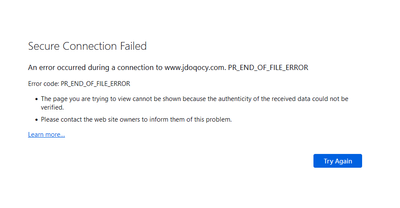
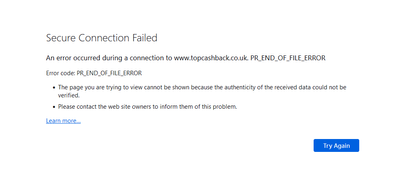
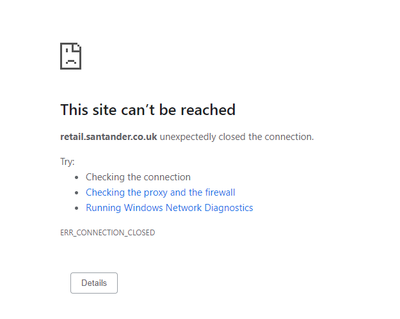
Is anyone else occasionally getting a 'connection down' error from Chrome (or 'Secure Connection Failed' from Firefox) when changing page - if I hit refresh it works fine. At first I wondered if it was the site I was using but have noticed it on multiple different major websites over the past couple of months and not noticed it from other locations where I don't use Three Broadband so does seem to be related to the router/connection (this is via wired Ethernet too, so not a WiFi problem). I've tried changing DNS server in case that helps but no difference.
It mainly seems to happen when trying to first load a site or (annoyingly) at checkout when a different site is being loaded as part of the checkout process. It certainly doesn't happen everytime but does happen with reasonable frequency. I've also noticed I often get it when trying to pull/push from/to Github too and have to do so a number of times for it to work (browsing the Github website works fine).
- Labels:
-
Home Broadband

- Mark as New
- Bookmark
- Subscribe
- Mute
- Subscribe to RSS Feed
- Highlight
- Report Inappropriate Content
on 26-08-2024 08:27 PM
Honestly my connection has been pretty poor the last few weeks, I assume due to the school holidays and what-not, so its been hard to tell what's an issue and what's congestion. I can say when I do a speed test I either get crazy ping times but decent speed or terrible signal which is usually fixed by rebooting or moving the router left or right by about a meter or so.
In all nothing to report because I have so many other issues right now

- Mark as New
- Bookmark
- Subscribe
- Mute
- Subscribe to RSS Feed
- Highlight
- Report Inappropriate Content
on 23-08-2024 11:00 PM
I've recently started to get this issue on my 5G home broadband. ie. PR_END_OF_FILE_ERROR in Firefox. Reloading the page multiple times will "solve" the problem, but it happens every few webpages.
I'm also getting problems with updating my Debian GNU/Linux, which also seems to be an issue with SSL.
I use a VPN a lot of the time, and with that (as others have mentioned) the issue disappears completely. However, sometimes I want to use the full "raw" connexion, or I have to do so because of geolocation for work, and the problem raises its head, persistently giving me problems with web pages and logins.

- Mark as New
- Bookmark
- Subscribe
- Mute
- Subscribe to RSS Feed
- Highlight
- Report Inappropriate Content
on 24-08-2024 10:33 AM
Cloudflare's WARP may potentially be faster than a traditional VPN (I posted some links in my message above) and has not given the usual error in my fairly long usage however it may not be suitable for geolocation purposes...
- Mark as New
- Bookmark
- Subscribe
- Mute
- Subscribe to RSS Feed
- Highlight
- Report Inappropriate Content
on 24-08-2024 12:44 PM
I use Debian GNU/Linux, I won't be putting Cloudflare's secret, non-free (free as in free speech) software onto my computer.
I'm happy with AirVPN, but Three ought to sort this problem out.

- Mark as New
- Bookmark
- Subscribe
- Mute
- Subscribe to RSS Feed
- Highlight
- Report Inappropriate Content
on 24-08-2024 12:40 PM
I use a VPN when I hit a problem and it does fix most things (but then again, using the VPN means that some new issues are introduced).
I haven’t tried the WARP option, but I really don’t want to have to loads different software on each device just to get it working, I either want the system to just work, or have something on the router that then fixes the connection for any device connected to it.
Come on Three, we really need a workable solution.

- Mark as New
- Bookmark
- Subscribe
- Mute
- Subscribe to RSS Feed
- Highlight
- Report Inappropriate Content
on 20-08-2024 09:48 AM
So, been suffering this for months now before stumbling over this thread.. Symptoms, same as others, Netflix on Amazon Fire can't login 99% of the time, Microsoft Authenticator fails 50%, Partners banking app failing 90% of the time..And various other apps and sites that vary from sometimes working, to every single time authentication (or something) fails..
I work from home, and when connected via the company VPN everything is absolutely fine, but that's not really a solution for everyone else in the house.. Another VPN on another computer works fine as well, sadly running a VPN for the whole house isn't prractical..
Using a Zyxel NR5103E 5G router, Adult Filter is on, but is supposed to be off (will be the 3rd time I've called to disable it! Works, then N random months later it'll be back on)..
Forcing the routers radio bands to only 4G bands gets things reliable and working again 100%, that's the only solution I've found (bar the VPN).. Downside is I get 120D/30U/30ms using 4G versus 900D/60U/20ms in 5G mode.. Not ideal, but it's a work-around for now, but I'm wearing tired of it it now..
Is swapping Routers an option here ? I'm guessing not since I see similar behaviour on my iPhone 15 Pro when connected to 5G, but not as bad as the Router is..
- Mark as New
- Bookmark
- Subscribe
- Mute
- Subscribe to RSS Feed
- Highlight
- Report Inappropriate Content
on 21-08-2024 06:10 PM
As far as I am aware, the routers provided by Three will not change anything however the only VPN-like alternative that I can recommend would be Cloudflare's WARP which is free and works on both computers and mobile devices with some more information present here in my first post in this thread and this following post (There might be a few other useful posts that I have forgotten although WARP may be faster than using a traditional VPN)
Hopefully there will be a proper solution to these issues sooner rather than later

- Mark as New
- Bookmark
- Subscribe
- Mute
- Subscribe to RSS Feed
- Highlight
- Report Inappropriate Content
on 14-08-2024 08:59 PM
Unusual observation while trying to update my game, DCS World, via the updater yet again today - which always gives the SSL errors and refuses to even start no matter how many times I relaunch the exe until I open the web page beforehand
I usually open the DCS web page in Firefox, and then quickly launch the updater exe in order to get it working. This time I loaded the webpage in chrome for a change, but the exe still refused to connect. Tried multiple times. The only way to get it to work was to switch back to Firefox, load website then, and then the exe launched without issue
- Mark as New
- Bookmark
- Subscribe
- Mute
- Subscribe to RSS Feed
- Highlight
- Report Inappropriate Content
on 15-08-2024 06:22 PM
Apart from Chrome and Firefox being different browsers, are you using the same add-ons and similar settings? That may explain things otherwise it is just ultimately unusual...
- Mark as New
- Bookmark
- Subscribe
- Mute
- Subscribe to RSS Feed
- Highlight
- Report Inappropriate Content
on 15-08-2024 07:15 PM
Yeah as far as I can tell things are pretty much the same - Ublock Origin on both browsers, only extra on Chrome is the Lastpass extension. While I dont think the strange chromefailing/firefoxworking is prob an avenue worth exploring (as Jonathan says - lots of red herrings) - and maybe Chrome was having its own fit. The installer itself basically fails every single time try to update unless visited the website beforehand.
That being said, I wouldnt want to remove it and reinstall fresh here, as I have around 700gb of game data with the modules I own etc....Though I can replicate the SSL error every time on running the DCS Updater if haven't launched the webpage for so long (even if no update is available)
However I suspect if someone downloaded just the small 12mb installer, waited a while after closing the page (an hour maybe to be sure) then I suspect the installer wont work either and be able to be replicate each time (I could potentially try this on another machine that doesnt have DCS installed) - if its theoretically a good non web browser way to reproduce the error

