- Order by phone: 0800 033 8006
- Blog
- Coverage checker
- Store locator

- Three Community
- Broadband
- Re: Intermittent connection issues loading/changin...
- Subscribe to RSS Feed
- Mark Topic as New
- Mark Topic as Read
- Float this Topic for Current User
- Bookmark
- Subscribe
- Mute
- Printer Friendly Page
Intermittent connection issues loading/changing site- secure connection failed/site can't be reached

- Mark as New
- Bookmark
- Subscribe
- Mute
- Subscribe to RSS Feed
- Highlight
- Report Inappropriate Content
on 22-10-2023 03:21 PM
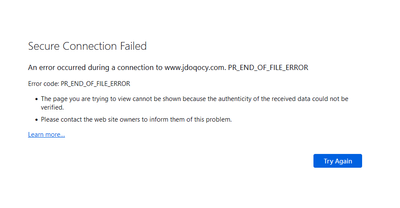
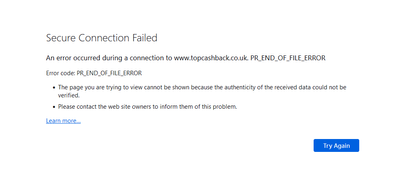
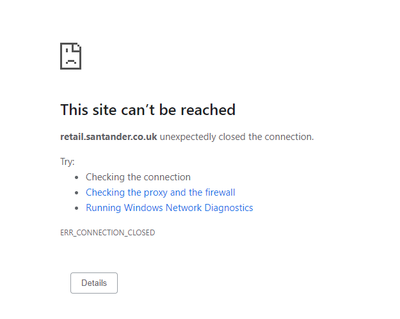
Is anyone else occasionally getting a 'connection down' error from Chrome (or 'Secure Connection Failed' from Firefox) when changing page - if I hit refresh it works fine. At first I wondered if it was the site I was using but have noticed it on multiple different major websites over the past couple of months and not noticed it from other locations where I don't use Three Broadband so does seem to be related to the router/connection (this is via wired Ethernet too, so not a WiFi problem). I've tried changing DNS server in case that helps but no difference.
It mainly seems to happen when trying to first load a site or (annoyingly) at checkout when a different site is being loaded as part of the checkout process. It certainly doesn't happen everytime but does happen with reasonable frequency. I've also noticed I often get it when trying to pull/push from/to Github too and have to do so a number of times for it to work (browsing the Github website works fine).
- Labels:
-
Home Broadband

- Mark as New
- Bookmark
- Subscribe
- Mute
- Subscribe to RSS Feed
- Highlight
- Report Inappropriate Content
on 02-11-2024 03:47 PM
I am out of your region but almost close (North West) although the closest tower to where I am has the same bands available... I can try testing at another tower nearby as that also has the same bands available to rule out the tower nearest to myself
Maybe there is something in the digital sea in this area?
- Mark as New
- Bookmark
- Subscribe
- Mute
- Subscribe to RSS Feed
- Highlight
- Report Inappropriate Content
on 30-10-2024 08:04 PM
When I went through the various Three MVNOs I did experience the same issues on all of them however, as we are all aware, the issues vary significantly in frequency
I am quite interested in your current results that seem to be caused by the manual band selection as I have not fully tested that under the various APNs. I will have to do that as I only touch the band settings when there are random signalling issues but that is fortunately rare and easily fixed
Thank you for your message and update!

- Mark as New
- Bookmark
- Subscribe
- Mute
- Subscribe to RSS Feed
- Highlight
- Report Inappropriate Content
on 31-10-2024 07:04 AM
Just to add, still working fine as of this morning, and that the band selection makes no difference and don't think that's the cause and didn't mean to imply that.. When I first re-enabled 5g it was running in auto band selection mode for hours and working fine before I changed it to get the reduced latency..
- Mark as New
- Bookmark
- Subscribe
- Mute
- Subscribe to RSS Feed
- Highlight
- Report Inappropriate Content
on 31-10-2024 04:44 PM
I have just done a series of checks using some of the usual trigger websites and https://mynoise.net/ gave the usual issue on both iD and Smarty's respective APNs needing two refreshes to actually load the page properly
Unfortunately only Band B3 has been available rather than the usual B1 and B3 with n78 therefore I will need to revisit this at another time
If it is still working for you then it may work for others

- Mark as New
- Bookmark
- Subscribe
- Mute
- Subscribe to RSS Feed
- Highlight
- Report Inappropriate Content
on 29-10-2024 12:54 PM
Which are you with and do they offer rolling month? I don't fancy being locked in for 12+ months to this terrible service.
- Mark as New
- Bookmark
- Subscribe
- Mute
- Subscribe to RSS Feed
- Highlight
- Report Inappropriate Content
on 29-10-2024 02:52 PM
I am currently with iD Mobile because they were cheaper than Three with no yearly rises but have the same pros and cons included which is to say:
- Fastest broadband speed in my area (Same as Three)
- Cheapest broadband available in my area (Cheaper than Three even when adding the cost of a used 5G router)
- Technically they offer a SIM only deal, not broadband, so you need a 5G router or tethering device - Same Three networking issues even with the iD Mobile's APN
There may be some SIM-only deal websites that can also offer you some additional savings that may be of interest and iD Mobile does offer a rolling monthly contract

- Mark as New
- Bookmark
- Subscribe
- Mute
- Subscribe to RSS Feed
- Highlight
- Report Inappropriate Content
on 25-10-2024 05:45 PM
Well its only been little over a day since I've switched away from Three for my BB detailed on my own post of 3+weeks of unusable net, but wow, just realised how so used I was to having issues with things loading and constant refreshes, that it feels like xmas has come early now that they're fixed, and browser extensions and apps work as they should!! After a while the constant refreshes from page errors became a normality.
Urge you all to look at other options for your area. Even if its just a few quid more its sanity restoring

- Mark as New
- Bookmark
- Subscribe
- Mute
- Subscribe to RSS Feed
- Highlight
- Report Inappropriate Content
on 25-10-2024 05:55 PM
@Midnight54 wrote:Urge you all to look at other options for your area. Even if its just a few quid more its sanity restoring
100%

- Mark as New
- Bookmark
- Subscribe
- Mute
- Subscribe to RSS Feed
- Highlight
- Report Inappropriate Content
on 24-10-2024 11:35 PM
No response @JonathanB ?
What happened to the information you took from people a couple of weeks back?


- Mark as New
- Bookmark
- Subscribe
- Mute
- Subscribe to RSS Feed
- Highlight
- Report Inappropriate Content
on 30-10-2024 10:14 AM
Hi @munk,
Thanks for sharing that info, and to everyone else who helped out. It wasn't conclusive, but did eliminate some possibilities. There's internal testing going on at the moment, building on that data I collected.
I'm sorry that these issues are ongoing, and that updates are infrequent, but I can assure you there's a number of colleagues working on investigating these issues for you all.
Thanks,
Jonathan
Mod tip! The author of a post can hit 'Accept as Solution', to highlight a reply that helped solved their query.

